
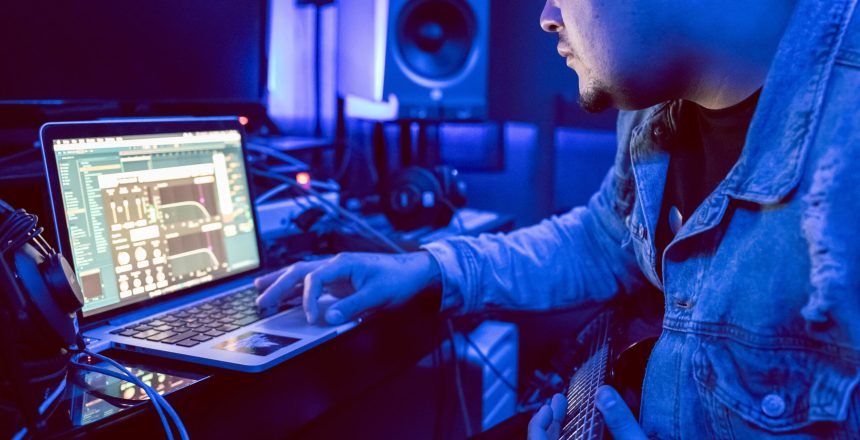
Choosing the best DAW for Windows and Mac is one of the most important decisions you’ll make as a music producer. Your DAW (Digital Audio Workstation) is the central hub where you record, edit, mix, and master your tracks. If you’re searching for the best digital audio workstations for Windows and Mac in 2025, you’ve Top Features of the Best Digital Audio Workstations for Windows and Mac in 2025
When choosing the best digital audio workstations for Windows and Mac, certain features can make a big difference in workflow and productivity. Key features to look for include:
- Multitrack recording: Record vocals, instruments, and effects seamlessly.
- MIDI support: Connect external synths and controllers for dynamic performances.
- Built-in plugins and effects: Add reverb, delay, compression, EQ, and virtual instruments without additional software.
- Export and cloud options: Move projects across devices for collaboration or further editing.
By prioritizing these features, you ensure your chosen DAW delivers professional results whether you’re a beginner or seasoned producer.
Choosing the Best Digital Audio Workstations for Windows and Mac: A Complete Guide
Finding the best digital audio workstations for Windows and Mac depends on your workflow, music genre, and budget. Some DAWs excel at electronic music, others at live recording, film scoring, or sound design. Compatibility, user interface, and plugin support are also key factors. Free options like Cakewalk and GarageBand are ideal for beginners, while premium DAWs like Pro Tools and Logic Pro cater to professionals.
Free vs Paid: Best Digital Audio Workstations for Windows and Mac Options
For new producers, free DAWs can be a great starting point:
- Cakewalk by BandLab (Windows) – Professional-level features, completely free.
- GarageBand (Mac) – Beginner-friendly and pre-installed on Macs.
- Tracktion Waveform Free (Windows & Mac) – Full-featured with no limitations.
- BandLab (Cloud-based) – Accessible from any device online.
Paid DAWs, on the other hand, provide advanced features, professional plugins, and more customization options suitable for serious music production.
FL Studio 2025 – FL Studio: One of the Best Digital Audio Workstations for Windows and Mac
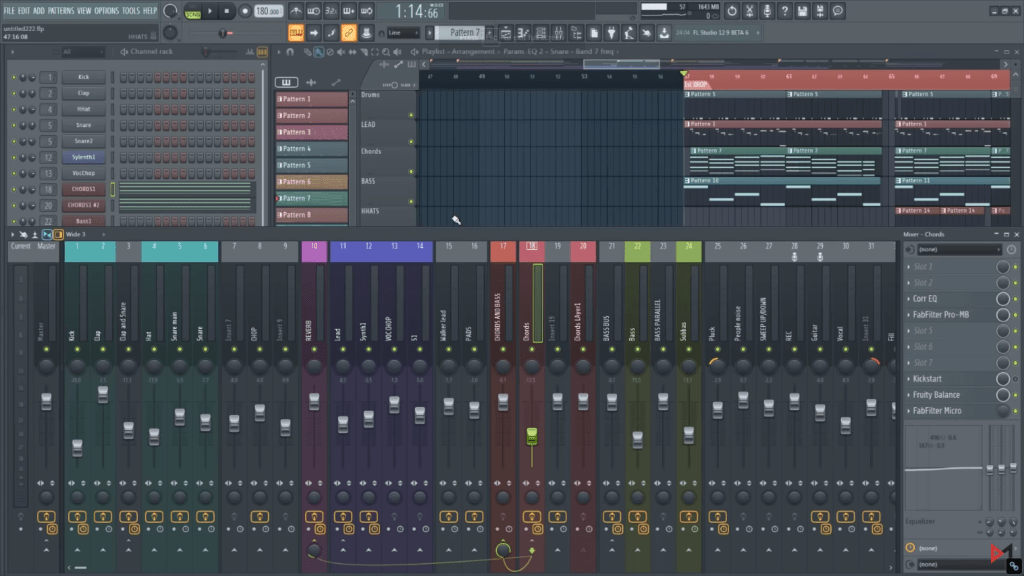
FL Studio is a digital audio workstation (DAW) that includes everything you need to make music. It has everything you need to write, arrange, record, edit, mix, and master professional-quality music in one package, representing over 20 years of revolutionary development.
FL Studio is widely regarded as one of the best digital audio workstations for Windows and Mac. In addition, this DAW offers intuitive MIDI editing, a powerful piano roll, and a large library of virtual instruments and plugins. Therefore, its versatility makes it ideal for both beginners and professional beat-makers.
Why It’s Great:
FL Studio is known for its piano roll MIDI editor, huge plugin library, and lifetime free updates, making it an affordable long-term investment.
FL Studio is known for its intuitive interface and MIDI editing tools, making it ideal for electronic producers:
Key Features:
- Intuitive piano roll for MIDI composition
- Large library of virtual instruments and plugins
- Lifetime free updates
- Excellent for beat-making and arranging
Pros:
- Beginner-friendly interface
- Affordable with lifetime updates
- Strong MIDI editing capabilities
Cons:
- Not optimal for live instrument recording
- Can feel overwhelming due to plugin options
Official Website: FL Studio 2025
Ableton Live 12 – Among the Best Digital Audio Workstations for Windows and Ma
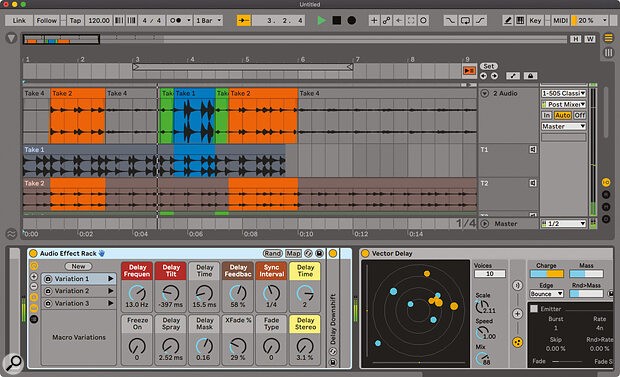
Ableton’s innovative session view makes auditioning loops and piecing ideas together a breeze, making it a favourite of electronic producers. Ableton Live is the best sample looper on the planet, with incredible sampling and synthesis plugins that turn it into a sound creative powerhouse.
Ableton Live is a favorite for electronic music thanks to its session view, flexible workflow, and sampling tools. It ranks as one of the best digital audio workstations for Windows and Mac for live performance and studio production alike.
With the release of Ableton 12, the DAW has added MIDI recall to make comping over ideas easier, as well as synchronization for live performance, a few new plugins, and more.
Ableton Live is perfect for electronic producers thanks to its session view and sampling tools:
Key Features:
- Session and Arrangement Views for flexible workflows
- Max for Live customization
- Powerful stock instruments and effects
- Excellent MIDI capabilities
Pros:
- Ideal for live shows and DJing
- Huge community and tutorial support
- Great for electronic music composition
Cons:
- Premium editions can be expensive
- Less optimized for traditional recording
Official Website: Ableton Live 12
Pro Tool 12 – Professional Choice for the Best Digital Audio Workstations for Windows and Mac

Pro Tools remains the industry standard DAW for recording engineers in 2025. It is the go-to DAW for professional studios worldwide. Knowledge of this DAW gives you a significant advantage if you want to work in the industry. It’s the most advanced program on the market. ProTools is used by the great majority of studios across the world.
Pro Tools is the industry standard in studios worldwide and is a top contender among the best digital audio workstations for Windows and Mac. It excels at recording live bands, editing, mixing, and film scoring.
Pro Tools is widely used in professional studios for recording live bands, mixing, and film scoring:
Key Features:
- Advanced audio editing and mixing
- Industry-standard plugin format (AAX)
- Cloud collaboration tools
- Handles large track counts efficiently
Pros:
- Professional-grade DAW for studio engineers
- High-quality audio editing
- Strong hardware integration
Cons:
- Subscription-based pricing
- Steeper learning curve
Official Website: Pro Tools 12
Logic Pro– Apple’s Best Digital Audio Workstations for Mac Users
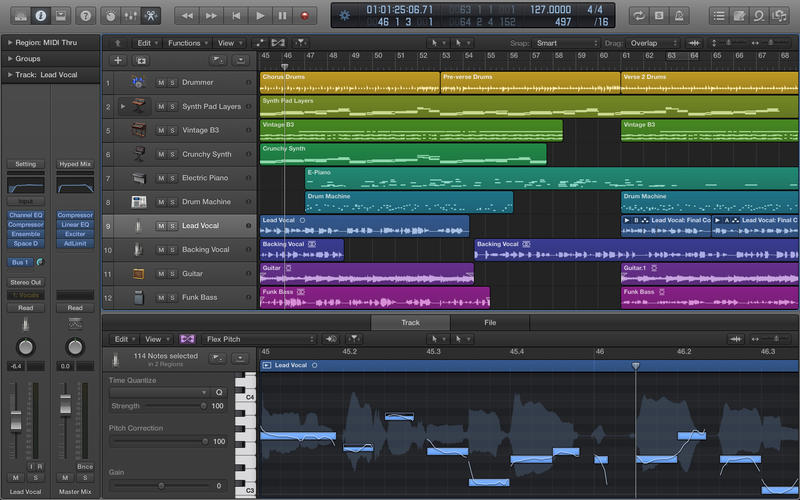
Logic Pro is Apple’s flagship DAW and the best DAW for Mac users in 2025. It offers a massive sound library, integrated plugins, and advanced features like Dolby Atmos mixing.
Logic for arranging, Tools for voice recording and mixing, and so on. LogicPro is a relatively inexpensive (about $200) yet Mac-only program. It’s simple to install plugins and virtual instruments, and the application doesn’t focus on any one style of music.
Logic Pro is Apple’s flagship DAW and is considered one of the best DAWs for Mac users.
Logic has flourished as a one-stop solution for audio production since Apple added an amazing array of integrated plugins and impressive flex time and flex pitch features.
Logic Pro is Apple’s flagship DAW, perfect for songwriting, production, and composition:
Key Features:
- Massive library of instruments and loops
- Smart Tempo and Flex Time
- Dolby Atmos mixing support
- Seamless macOS integration
Pros:
- Affordable one-time purchase
- Great for songwriters and producers
- Extensive sound library
Cons:
- Mac-only
- Can overwhelm beginners
Official Website: Logic Pro
Universal Audio – LUNA – Best Digital Audio Workstations for Windows and Mac with Analog Workflow
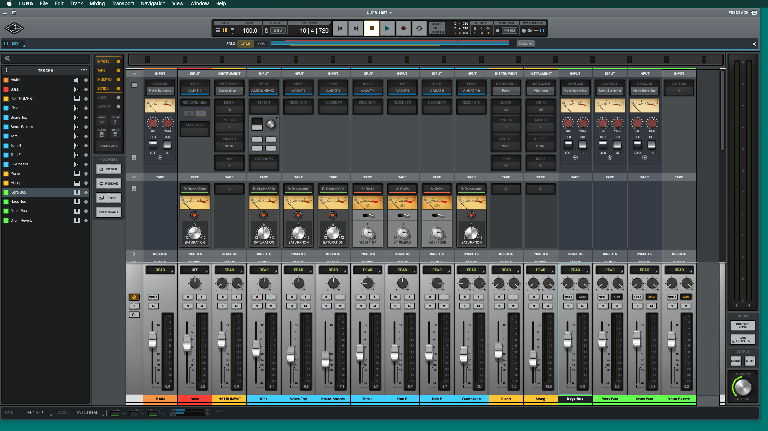
LUNA is Universal Audio’s analog-style DAW, designed to integrate seamlessly with Apollo audio interfaces. LUNA is a comprehensive music production environment that allows you to track, edit, and mix all of your tracks in a single, easy-to-use interface.
Furthermore, LUNA is a powerful audio software that can easily replace your DAW, mixing console, and outboard processors. Best of all, it includes UA’s legendary analog modelling incorporated right into LUNA’s virtual mixer.
Why It’s Great:
Universal Audio’s LUNA Recording System integrates tightly with Apollo interfaces. It delivers near-zero latency and a studio-like analog workflow. Consequently, for Mac-based engineers, it is a strong choice.
LUNA integrates with UA Apollo hardware for near-zero latency and analog-style mixing:
Key Features:
- Analog-style summing and tape emulation
- Real-time tracking with UAD plugins
- Unlimited track count
Pros:
- Studio-like analog workflow
- Seamless hardware-software integration
- Exceptional sound quality
Cons:
- Mac-only
- Best experience with UA hardware
Official Website: LUNA
PreSonus Studio One 5– All-Around Best Digital Audio Workstations for Windows and Mac
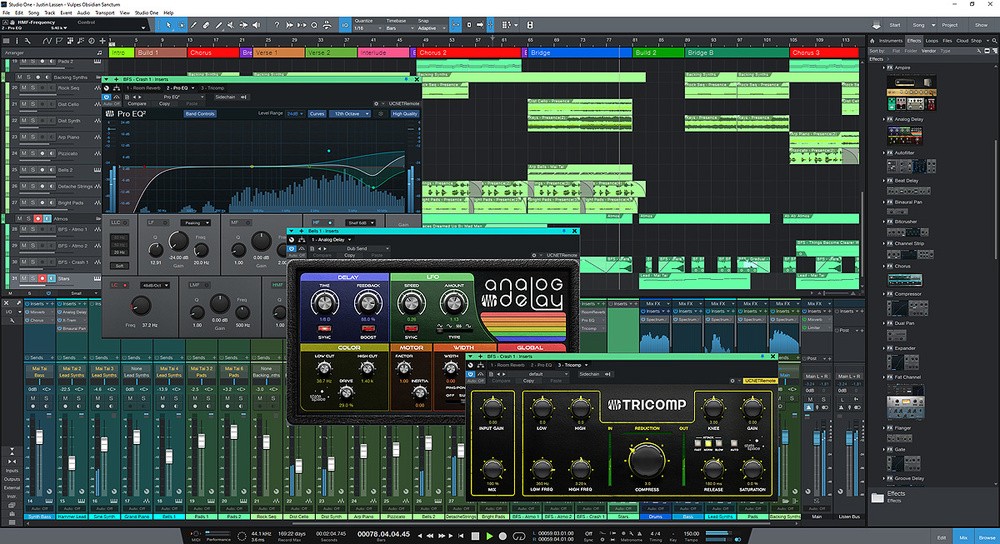
Studio One 5 provides a drag-and-drop workflow, integrated mastering tools, and Melodyne pitch correction. It is one of the best digital audio workstations for Windows and Mac, suitable for beginners and professionals. As a result, Studio One is ideal for composers who need to work with complex arrangements. Studio One comes with flawless compatibility with the rest of the company’s products, as well as VST/AU Format support as standard.
Why It’s Great:
Studio One by PreSonus is known for its drag-and-drop workflow and intuitive layout. Moreover, it’s versatile and efficient, appealing to both beginners and professionals. Many consider it one of the best DAW for Windows and Mac overall.
Studio One 5 offers an intuitive workflow for beginners and professionals alike:
Key Features:
- Drag-and-drop workflow
- Integrated mastering suite
- Melodyne pitch correction in higher editions
Pros:
- User-friendly interface
- Balanced features and pricing
- Regular updates and strong support
Cons:
- Smaller community than Ableton or FL Studio
- Advanced features in higher editions only
Official Website: Studio One 5
Steinberg Cubase 12 – Best Digital Audio Workstations for Windows and Mac for Composers
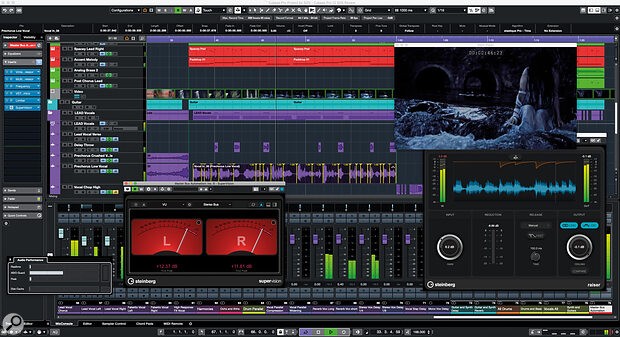
Cubase 12 is ideal for composers and arrangers thanks to its advanced MIDI tools, Chord and Scale Assistants, and video integration for film scoring. It ranks among the best digital audio workstations for Windows and Mac for professional composition.
Cubase 12 comes with several new features and workflow improvements that make composing, recording, and mixing music even more enjoyable. From increased audio-to-MIDI and new effects to improved MIDI Remote integration and editing tools, Cubase 12 will bring your creative ideas to life better – and faster – than ever before.
The Scale Assistant in VariAudio combines two powerful tools to make pitch editing a pleasure, whether you want to get creative with melodies or alter the pitch of your recordings.
Key Features:
- Advanced MIDI and scoring tools
- Chord and Scale Assistants
- Video integration for film scoring
Pros:
- Excellent for composers and arrangers
- Professional-grade plugins
- Reliable performance
Cons:
- Higher price
- Less beginner-friendly
Official Website: Cubase 12
Cakewalk Sonar Platinum – Best Free DAWs for Windows
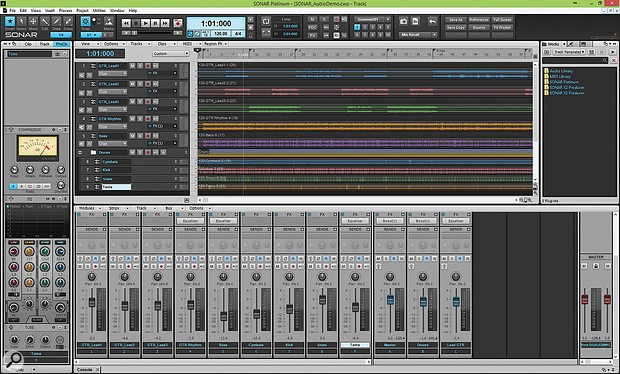
Cakewalk’s flagship DAW is SONAR Platinum. It comes with an industry-leading set of tools, plug-in effects, and instruments that provide incredible flexibility and sound quality for those looking to take their professional output to the next level. Increase the efficiency of your productions with the workflow that only SONAR Platinum can provide.
Why It’s Great:
Once a premium DAW under the name Sonar Platinum, Cakewalk was revived by BandLab and re-released as Cakewalk by BandLab—and it’s completely free. With pro features that rival premium DAWs, it’s one of the best free options for Windows users. Furthermore, it offers unlimited tracks and VST3 support.
However, Cakewalk by BandLab is a free professional DAW for Windows users:
Key Features:
- Unlimited audio and MIDI tracks
- Advanced mixing console with ProChannel modules
- VST3 support and built-in mastering
Pros:
- Completely free with pro-level features
- Ideal for live instrument recording
- Excellent mixing environment
Cons:
- Windows-only
- Smaller plugin library
Official Website: Cakewalk
Reason 133233
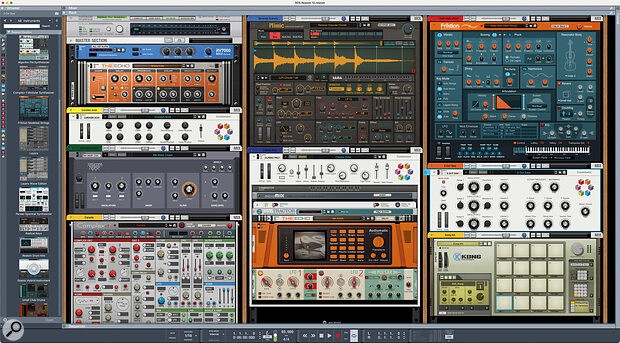
The Reason Rack is among the music’s most powerful and versatile sound design and beat-making tools. Reason 13 is unique because it combines a DAW with a virtual rack of instruments and effects. ts rack-based workflow lets producers “cable” virtual devices together just like hardware, making it an exciting option for sound designers and electronic producers looking for the best DAW for Windows and Mac that inspires creativity.
Reason 13 combines a DAW with a virtual rack of instruments and effects:
Key Features:
- Modular rack with instruments and effects
- Reason Rack Plugin for use inside other DAWs
- High-quality synths and samplers
Pros:
- Endless sound design possibilities
- Standalone or plugin mode
- Inspires creative workflows
Cons:
- Not as streamlined for traditional recording
- CPU-intensive with complex racks
Official Website: Reason 13
Bitwig Studio
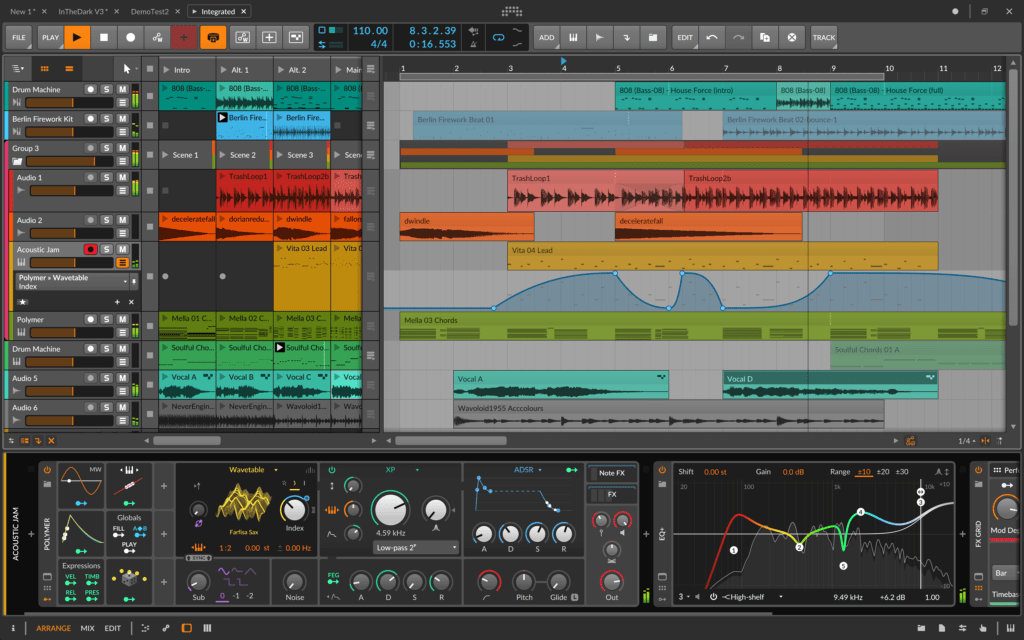
Bitwig Studio, which is built on modern foundations, has everything you’d expect from a modern music composition system. Bitwig Studio’s modulation system lets you modulate any device, VST plug-in, or hardware parameter with Macro controls, Note Expressions, LFOs, and Envelopes.
Moreover, Hardware integration is a large part of what makes Bitwig Studio unique. This includes MIDI handling, note timing, and latency compensation. MIDI Clock Sync and Ableton LINK are two other notable features. The hardware integration devices that make Bitwig Studio truly unique.
Bitwig Studio is highly modular, perfect for electronic and experimental producers:
Key Features:
- Modular “Grid” environment for instruments
- Advanced modulation system
- Multi-platform support (Windows, Mac, Linux)
Pros:
- Flexible and creative
- Excellent for electronic music
- Clip-launching workflow similar to Ableton
Cons:
- Smaller user community
- Learning curve for beginners
Official Website: Bitwig Studio
Factors to Consider When Choosing the Best DAW for Windows and Mac
When comparing DAWs, consider:
- Compatibility: Does it run well on your computer?
- Workflow: Do you prefer loop-based or linear recording?
- Genre: EDM (FL Studio, Ableton) vs. film scoring (Cubase, Logic).
- Budget: Free DAWs like Cakewalk or GarageBand vs. premium DAWs.
- Plugins: Support for VST, AU, or AAX formats.
Best Free DAWs for Windows and Mac in 2025
- Cakewalk by BandLab (Windows) – Pro-level DAW, completely free
- GarageBand (Mac) – Beginner-friendly, comes free with macOS
- Tracktion Waveform Free (Windows & Mac) – Full-featured DAW with no limits
- BandLab Online DAW (Web-based) – Cloud-based collaboration tool
FAQs About the Best DAW for Windows and Mac
1. What is the best DAW for beginners?
FL Studio and GarageBand are the most beginner-friendly DAWs.
2. Which DAW is free and professional?
Cakewalk by BandLab is the best free professional DAW for Windows.
3. What is the best DAW for Mac users?
Logic Pro is the most popular and powerful DAW for Mac producers.
4. Which DAW is best for live performance?
Ableton Live is the best DAW for DJs and live performers.
5. Do professionals still use Pro Tools?
Yes. Pro Tools remains the industry standard for recording studios worldwide.
Final Thoughts: Choosing the Best DAW for Windows and Mac in 2025
The best DAW for Windows and Mac in 2025 depend on your style, budget, and workflow:
- Electronic producers: Ableton Live, FL Studio
- Composers: Cubase, Logic Pro
- Mixing engineers: Pro Tools
- All-around producers: Studio One, Reaper
In conclusion, the best digital audio workstations for Windows and Mac depend on your genre, workflow, and budget. Electronic producers may prefer Ableton Live or FL Studio, composers often use Cubase or Logic Pro, while Pro Tools excels for mixing engineers. Testing multiple DAWs will help you find the one that maximizes your creativity and productivity.